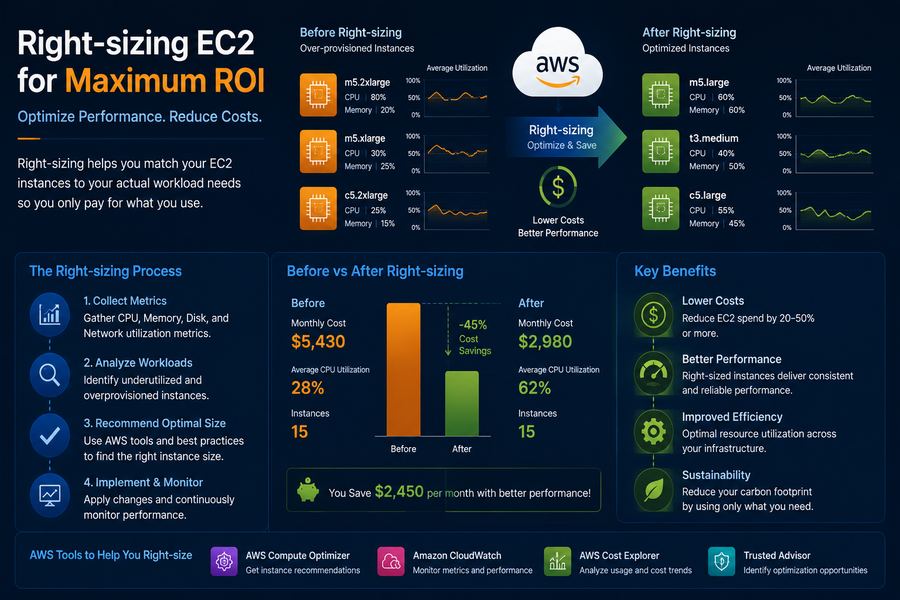
EC2 right-sizing is one of the most effective ways to optimize your AWS costs and performance. By matching instance sizes to actual workload requirements, organizations can achieve cost savings of 30-50% while maintaining or improving performance.
In this comprehensive guide, we'll cover:
- What is EC2 right-sizing?
- Why right-sizing matters
- Tools and metrics for right-sizing
- Step-by-step right-sizing strategy
- EC2 instance families and their use cases
- Workload-specific recommendations
- Common mistakes to avoid
What is EC2 Right-sizing?
EC2 right-sizing is the process of matching instance types and sizes to the actual performance requirements of your workloads. By analyzing utilization metrics, you can downsize over-provisioned instances and upgrade under-provisioned ones to optimize both cost and performance.
Why Right-sizing Matters
- Cost Savings: Reduce waste from over-provisioned instances
- Performance Optimization: Ensure instances have adequate resources
- Resource Efficiency: Make better use of cloud resources
- Sustainability: Reduce your carbon footprint
Tools for Right-sizing
- AWS Compute Optimizer: Machine learning-powered recommendations for instance optimization
- Amazon CloudWatch: Monitor CPU, memory, network, and disk utilization
- AWS Cost Explorer: Analyze usage patterns and identify opportunities
- AWS Trusted Advisor: Cost optimization checks and recommendations
- Third-party tools: CloudHealth, CloudCheckr, and others
Right-sizing Strategy
Step-by-Step Approach
- Collect Data: Gather utilization metrics for 14-29 days
- Analyze Patterns: Identify peak usage and average utilization
- Set Baselines: Define acceptable utilization thresholds
- Recommend Changes: Generate right-sizing recommendations
- Test Changes: Apply changes to non-production environments first
- Monitor Results: Track performance and cost impact
- Iterate: Continuously optimize based on changing workloads
Right-sizing Rules
- CPU: Target 40-70% utilization
- Memory: Target 60-80% utilization
- Network: Target 50-70% utilization
- Disk I/O: Target 50-70% utilization
EC2 Instance Families
Understanding EC2 instance families is crucial for right-sizing:
Right-sizing by Workload
Web Servers
- Recommendation: General Purpose (M6i, M5) or ARM (M6g)
- Key Metrics: CPU utilization, network traffic
- Consider: Auto-scaling groups for variable traffic
Database Servers
- Recommendation: Memory Optimized (R6i, R5) or Storage Optimized (I3)
- Key Metrics: Memory utilization, IOPS, disk throughput
- Consider: AWS RDS for managed database solutions
Batch Processing
- Recommendation: Compute Optimized (C6i, C5)
- Key Metrics: CPU utilization, memory usage
- Consider: Spot instances for cost savings
Development/Test
- Recommendation: Burstable (T3, T4g)
- Key Metrics: CPU credits, baseline performance
- Consider: Stop/start schedules for non-production
Common Mistakes to Avoid
- Not collecting enough data: Always analyze 14-29 days of metrics
- Ignoring memory utilization: Memory is often the bottleneck
- Not testing changes: Always test in staging first
- Forgetting about performance: Right-sizing should balance cost and performance
- Not monitoring post-change: Always monitor after making changes
Case Study: Right-sizing Success
Company: Global Financial Services
Challenge: 500+ EC2 instances with 70% over-provisioned
Solution: Implemented right-sizing strategy using AWS Compute Optimizer
Results:
- ✅ 35% reduction in EC2 costs
- ✅ $180,000 annual savings
- ✅ Improved performance for 20% of workloads
- ✅ 100% migration success rate
Right-sizing Checklist
- ✅ Analyze CPU utilization for 29 days
- ✅ Monitor memory utilization patterns
- ✅ Track network throughput
- ✅ Review disk I/O performance
- ✅ Check instance family suitability
- ✅ Consider Graviton instances
- ✅ Test changes in staging first
- ✅ Monitor post-change performance
At DeployInCloud, we've helped 500+ enterprises right-size their EC2 instances and achieve cost savings of 30-50%. Contact us for a free right-sizing assessment today.