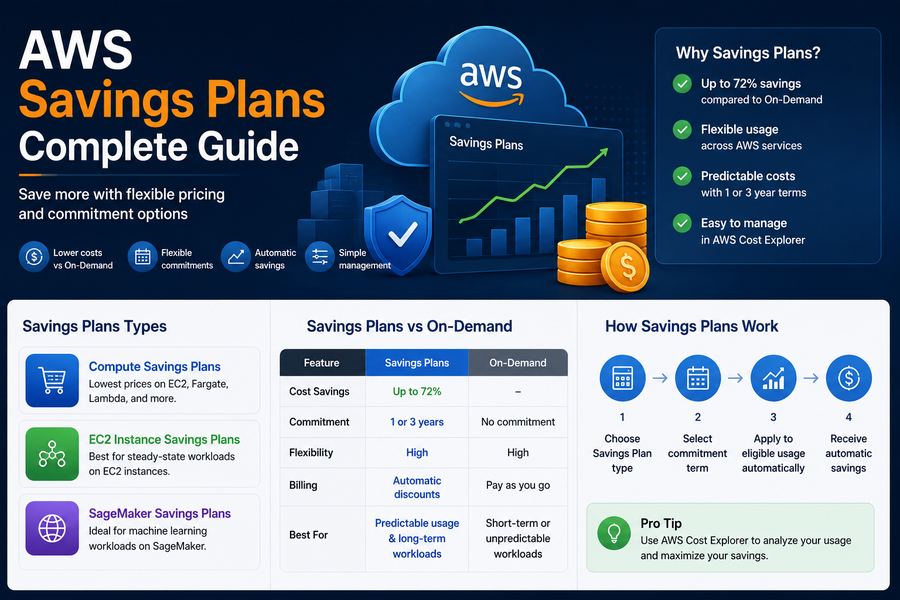
AWS Savings Plans offer a flexible and powerful way to reduce your cloud costs by up to 66% compared to On-Demand pricing. Unlike Reserved Instances, Savings Plans apply to a wider range of services and offer more flexibility.
In this comprehensive guide, we'll cover:
- Types of Savings Plans
- When to use each type
- How Savings Plans compare to Reserved Instances
- Best practices for implementation
- How to monitor and optimize your Savings Plans
What Are AWS Savings Plans?
AWS Savings Plans are a flexible pricing model that offer significant discounts in exchange for a commitment to a consistent amount of compute usage (measured in $/hour) for a 1- or 3-year term. Unlike Reserved Instances, Savings Plans can be applied across multiple service types, including EC2, Fargate, and Lambda.
Types of Savings Plans
AWS offers three types of Savings Plans:
1. Compute Savings Plans
Compute Savings Plans offer the most flexibility and apply to EC2, Fargate, and Lambda usage. They automatically apply to any instance family, size, or region.
- Coverage: EC2, Fargate, Lambda
- Savings: Up to 66%
- Flexibility: Highest
- Best For: Mixed workloads across multiple services
2. EC2 Instance Savings Plans
EC2 Instance Savings Plans apply only to EC2 instances within a specific region. They offer similar savings to Compute Savings Plans but with less flexibility.
- Coverage: EC2 only
- Savings: Up to 66%
- Flexibility: Medium
- Best For: EC2-focused workloads with predictable usage
3. SageMaker Savings Plans
SageMaker Savings Plans are designed specifically for machine learning workloads on Amazon SageMaker.
- Coverage: SageMaker only
- Savings: Up to 50%
- Flexibility: Low
- Best For: Machine learning workloads on SageMaker
Savings Plans Comparison
| Feature | Compute SP | EC2 Instance SP | SageMaker SP |
|---|---|---|---|
| Coverage | EC2, Fargate, Lambda | EC2 only | SageMaker only |
| Savings | Up to 66% | Up to 66% | Up to 50% |
| Flexibility | ⭐⭐⭐⭐⭐ | ⭐⭐⭐ | ⭐⭐ |
| Term | 1 or 3 years | 1 or 3 years | 1 or 3 years |
| Region | Any region | Specific region | Any region |
| Instance Family | Any family | Specific family | N/A |
Savings Plans vs. Reserved Instances
Both Savings Plans and Reserved Instances offer significant savings, but they serve different purposes:
| Feature | Savings Plans | Reserved Instances |
|---|---|---|
| Coverage | EC2, Fargate, Lambda, SageMaker | EC2 only (with limited exceptions) |
| Flexibility | Highest | Limited (Standard) / High (Convertible) |
| Savings | Up to 66% | Up to 72% |
| Capacity Reservation | No | Yes (Zonal RIs) |
| Best For | Mixed compute workloads | Predictable EC2 workloads |
Implementation Best Practices
1. Analyze Your Usage
Use AWS Cost Explorer to analyze your compute usage patterns over the last 30-60 days. Identify the services and instance families that make up the majority of your spend.
2. Choose the Right Plan
- Compute Savings Plans: If you use multiple services (EC2, Fargate, Lambda)
- EC2 Instance Savings Plans: If you only use EC2 and want lower costs
- SageMaker Savings Plans: If you use SageMaker extensively
3. Start with 1-Year Terms
Begin with a 1-year commitment to test the waters. You can always renew for a 3-year term later for higher savings.
4. Monitor Your Coverage
Use AWS Cost Explorer to monitor your Savings Plans coverage. Aim for 80-90% coverage for optimal savings.
5. Combine with RIs
Use both Savings Plans and Reserved Instances for maximum coverage and savings.
Common Mistakes to Avoid
- Over-committing: Only commit to usage you're confident about
- Under-committing: Leaving savings on the table by not committing enough
- Choosing the wrong term: 3-year terms offer higher savings but require longer commitment
- Not monitoring coverage: Regular monitoring helps you optimize your commitment
At DeployInCloud, we've helped 500+ enterprises implement Savings Plans and achieve cost savings of 35-40%. Contact us for a free cost optimization assessment today.