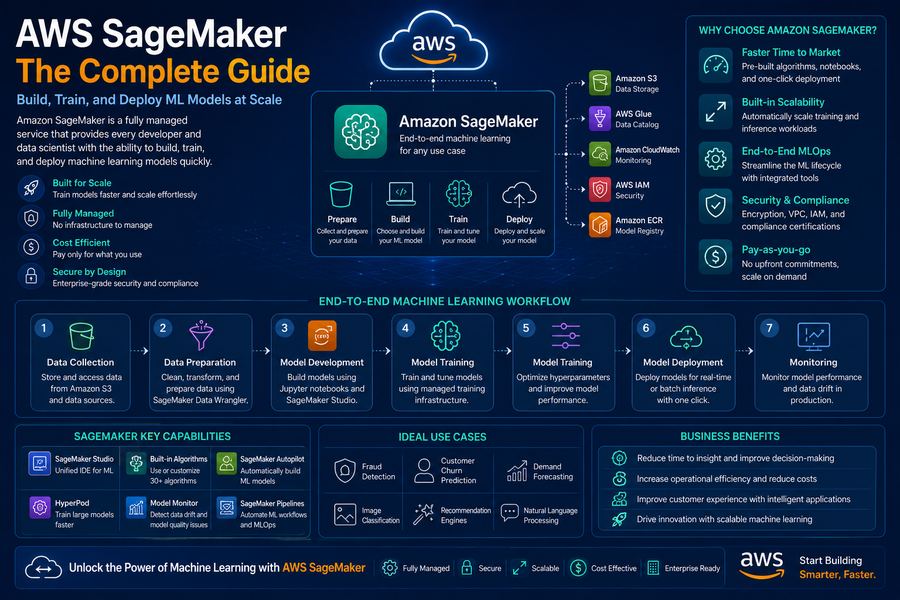
Amazon SageMaker is a fully managed machine learning service that enables data scientists and developers to build, train, and deploy ML models quickly. It removes the heavy lifting from each step of the ML workflow, allowing you to focus on solving business problems.
Key Features
Built-in Algorithms
Pre-built, optimized algorithms for common ML tasks including classification, regression, and clustering.
AutoML (Autopilot)
Automatically explore different algorithms and hyperparameters to find the best model for your data.
Distributed Training
Scale training across multiple instances for faster model development.
One-Click Deployment
Deploy models to production with a single click, including auto-scaling and monitoring.
ML Pipelines
Build, automate, and manage end-to-end ML workflows with SageMaker Pipelines.
Model Monitoring
Monitor model performance and detect drift in production environments.
SageMaker Workflow
The SageMaker workflow follows a standard ML lifecycle:
Prepare Your Data
Upload and preprocess your data using SageMaker Data Wrangler or SageMaker Processing.
Build Your Model
Choose built-in algorithms, use AutoML, or bring your own custom code and frameworks.
Train Your Model
Train models at scale using SageMaker training jobs with distributed computing.
Optimize Hyperparameters
Automatically tune hyperparameters to find the optimal model configuration.
Deploy to Production
Deploy models to real-time endpoints or batch transform jobs.
Monitor Performance
Track model performance, detect drift, and retrain as needed.
Model Training
Training Options
- Built-in Algorithms: Pre-optimized algorithms for common use cases
- Custom Training: Bring your own scripts and frameworks (TensorFlow, PyTorch, etc.)
- AutoML: Automated model selection and hyperparameter tuning
Training Best Practices
- Use distributed training for large datasets
- Implement early stopping to save time and resources
- Use managed spot training for cost savings
- Monitor training jobs with CloudWatch
Model Deployment
Deployment Options
- Real-time Inference: Deploy as a REST API endpoint
- Batch Transform: Process large datasets offline
- Async Inference: Queue-based inference for large payloads
- Multi-model Endpoints: Host multiple models on a single endpoint
Deployment Best Practices
- Enable auto-scaling for production endpoints
- Implement blue-green deployments for zero downtime
- Use CloudWatch for monitoring and alerts
- Implement model versioning and rollback strategies
Pricing Model
| Service Component | Cost Factor | Best For |
|---|---|---|
| Studio | Per user per hour | Development & experimentation |
| Training Jobs | Instance type + duration | Model training |
| Inference Endpoints | Instance type + duration | Production deployment |
| Data Storage | Per GB stored | Data storage |
Best Practices
- Start with Autopilot: Use SageMaker Autopilot for quick proof-of-concept models
- Use Pipelines: Automate your ML workflow with SageMaker Pipelines
- Monitor Models: Implement Model Monitor for production models
- Optimize Costs: Use spot instances for training and right-size endpoints
- Secure Your Data: Use IAM roles, encryption, and VPC for security
At DeployInCloud, we help enterprises build and deploy ML solutions with SageMaker. Contact us for a free ML assessment today.