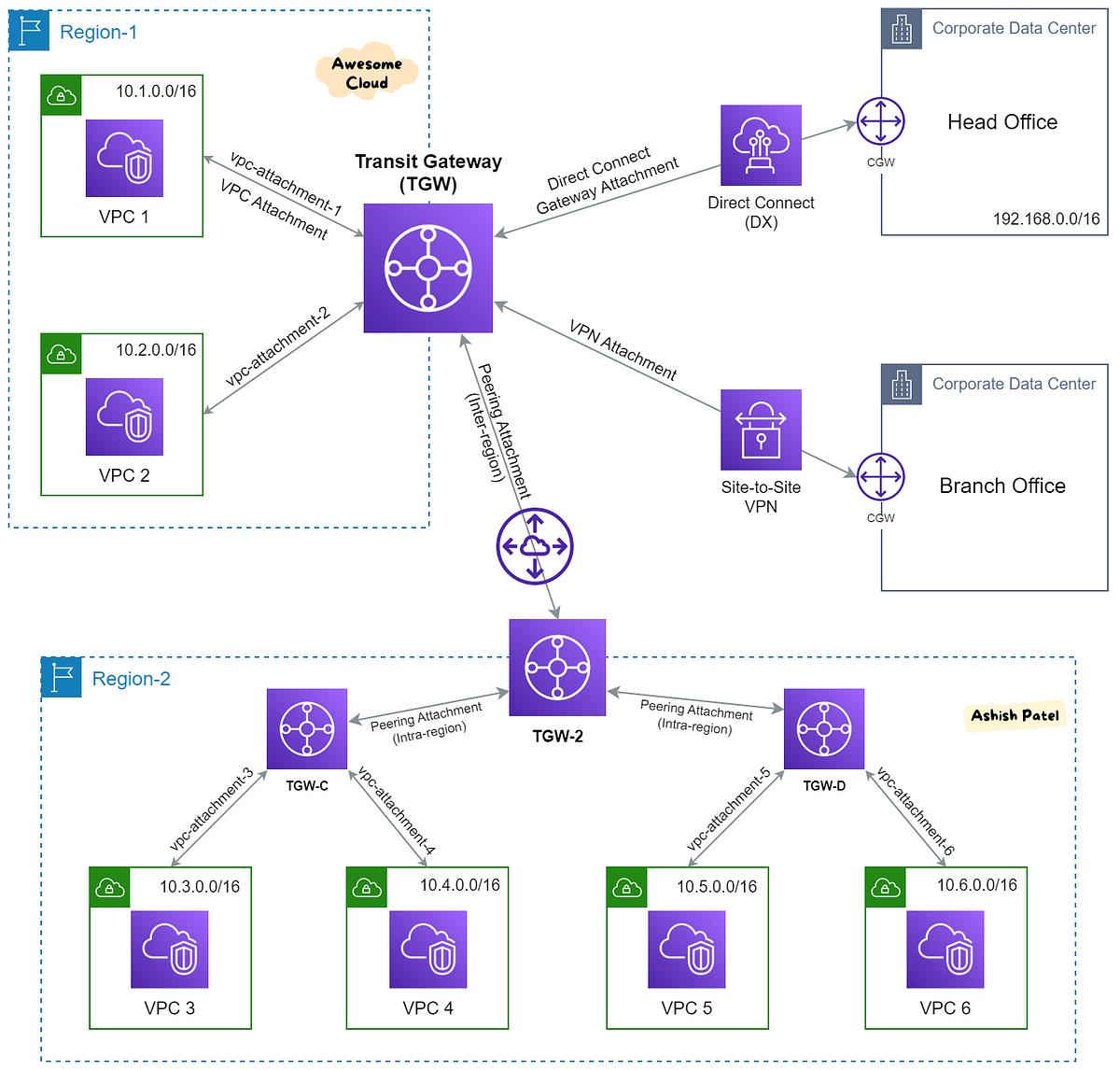
AWS Transit Gateway is a network transit hub that connects your VPCs, on-premises networks, and VPNs using a central hub-and-spoke model. It simplifies network architecture and reduces operational complexity for large-scale cloud deployments.
What is AWS Transit Gateway?
AWS Transit Gateway is a regional service that acts as a central hub for connecting multiple VPCs, on-premises networks, and remote networks. It enables:
- Simplified Connectivity: Connect hundreds of VPCs without complex peering
- Centralized Management: Manage network routing from a single point
- Scalability: Scale to thousands of network connections
- Cost Efficiency: Reduce data transfer costs with centralized routing
- Security: Centralize security controls and monitoring
Key Features of AWS Transit Gateway
Hub-and-Spoke Model
Central hub connects multiple VPCs and networks, simplifying management and reducing complexity.
Transitive Routing
Supports transitive routing between connected networks, enabling communication across all attachments.
Centralized Security
Implement security appliances and controls at the hub level for consistent security enforcement.
Cross-Region Peering
Connect Transit Gateways across different AWS regions for global network connectivity.
VPN & Direct Connect
Integrate with VPN and AWS Direct Connect for hybrid cloud connectivity.
Cost Optimization
Reduce data transfer costs by optimizing traffic paths and centralizing routing.
How AWS Transit Gateway Works
AWS Transit Gateway operates on a simple but powerful model:
1. Transit Gateway
The central hub that connects all network attachments. Each region can have multiple Transit Gateways for different purposes.
2. Attachments
Various network connections that can be attached to the Transit Gateway:
- VPC Attachments: Connect VPCs using subnet-level connectivity
- VPN Attachments: Connect on-premises networks via Site-to-Site VPN
- Direct Connect Gateway: Connect via AWS Direct Connect
- Transit Gateway Peering: Connect to Transit Gateways in other regions
- Connect Attachments: Connect to SD-WAN or third-party appliances
3. Route Tables
Transit Gateway uses route tables to control traffic between attachments. Each attachment can have its own route table for granular control.
4. Propagation
Route propagation automatically adds routes from attachments to route tables. This simplifies management and ensures consistent routing.
Common Use Cases
1. Multi-VPC Connectivity
Connect multiple VPCs across different accounts and regions without complex VPC peering arrangements. Ideal for organizations with many VPCs.
2. Hybrid Cloud Networking
Connect on-premises data centers with multiple VPCs using VPN or Direct Connect. Enable seamless communication between cloud and on-premises workloads.
3. Centralized Security
Inspect and filter traffic between VPCs and on-premises networks using security appliances attached to the Transit Gateway.
4. Global Network Connectivity
Connect VPCs and on-premises networks across multiple regions using Transit Gateway peering for a global network.
5. Cloud Migration
Simplify cloud migration by connecting on-premises networks and VPCs without modifying existing network configurations.
VPC Peering vs. Transit Gateway
| Feature | VPC Peering | Transit Gateway |
|---|---|---|
| Scale | Limited (point-to-point) | Scalable (hub-and-spoke) |
| Transitive Routing | No | Yes |
| Management Complexity | High (n2 peering) | Low (central hub) |
| Cross-Region | Yes | Yes |
| VPN Support | No | Yes |
| Cost | Lower per connection | Higher but better for scale |
Design Best Practices
1. Plan Your Attachment Strategy
- Group VPCs by environment (Dev, Test, Prod) for easier management
- Use separate Transit Gateways for different environments if needed
- Plan your CIDR ranges to avoid overlap
2. Implement Security Controls
- Use Network ACLs and Security Groups for fine-grained control
- Implement security appliances for advanced security (firewall, IDS/IPS)
- Enable VPC Flow Logs for visibility into network traffic
3. Optimize Routing
- Use route tables to control traffic flow
- Implement route propagation for simplified management
- Use route priorities for traffic engineering
4. Plan for High Availability
- Deploy Transit Gateway in multiple Availability Zones
- Use multiple VPN connections for redundancy
- Implement Direct Connect for critical workloads
Security Considerations
- IAM Policies: Control who can create and manage Transit Gateway attachments
- Network ACLs: Use Network ACLs for subnet-level security
- Security Groups: Use Security Groups for instance-level security
- VPC Flow Logs: Enable Flow Logs for monitoring and troubleshooting
- Encryption: Use encryption for VPN connections and data in transit
Cost Considerations
- Hourly Charge: Transit Gateway has an hourly charge per attachment
- Data Transfer: Pay for data processed through the Transit Gateway
- VPC Peering Comparison: Transit Gateway may be more cost-effective for large-scale deployments
- Optimization: Reduce data transfer costs by optimizing traffic paths
Implementing Transit Gateway
Step-by-Step Setup
- Create Transit Gateway: Create in your desired region
- Create Attachments: Attach VPCs, VPNs, or Direct Connect
- Configure Route Tables: Set up route tables and associations
- Enable Route Propagation: Propagate routes from attachments
- Test Connectivity: Validate network connectivity between attachments
- Monitor: Enable logging and monitoring for visibility
✅ Transit Gateway Checklist
- ✅ Define connectivity requirements
- ✅ Create Transit Gateway in the correct region
- ✅ Plan attachment types and configurations
- ✅ Configure route tables and associations
- ✅ Enable route propagation
- ✅ Implement security controls
- ✅ Set up monitoring and logging
- ✅ Test and validate connectivity
At DeployInCloud, we help enterprises design and implement AWS Transit Gateway architectures. Contact us for a free network assessment today.