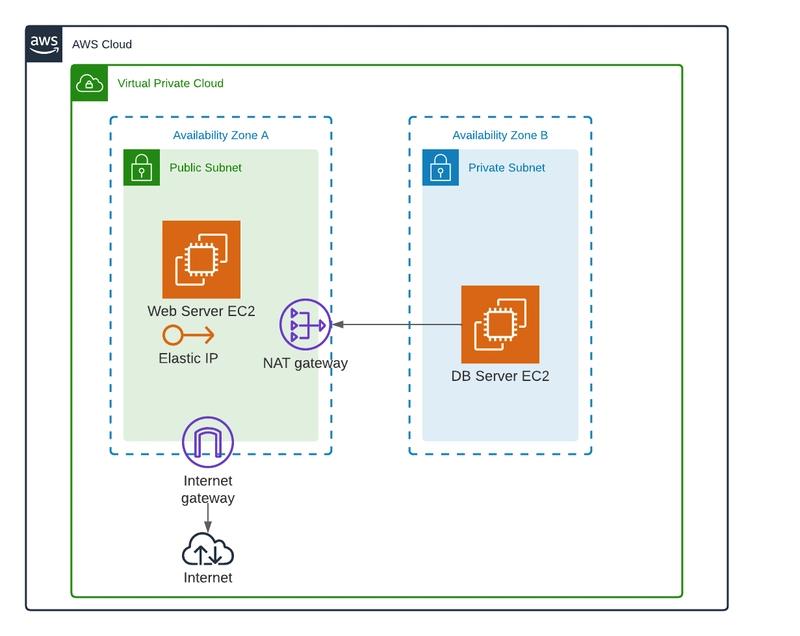
Amazon Virtual Private Cloud (VPC) is the foundation of your AWS networking infrastructure. A well-architected VPC provides security, scalability, and reliability for your applications. This guide covers best practices for designing and implementing secure VPCs.
What is Amazon VPC?
Amazon VPC is a virtual network that closely resembles a traditional network you'd operate in your own data center. It provides:
- Logical Isolation: Your own private network in AWS
- Subnet Segmentation: Divide your VPC into public and private subnets
- Security Controls: Security Groups and Network ACLs
- Connectivity Options: Internet Gateway, VPN, Direct Connect
- Traffic Management: Route tables and NAT gateways
1. VPC Design Best Practices
Use Non-Overlapping CIDR Blocks
Choose CIDR blocks that don't overlap with your on-premises networks or other VPCs. Use RFC 1918 private IP ranges (10.0.0.0/8, 172.16.0.0/12, 192.168.0.0/16).
Create Multiple Subnet Tiers
Design your VPC with public, private, and database subnets. Use public subnets for load balancers and bastion hosts, private subnets for application servers, and database subnets for data stores.
Deploy Across Multiple Availability Zones
Distribute your subnets across at least 2-3 Availability Zones for high availability and fault tolerance.
Plan for Scalability
Design your VPC with CIDR blocks that are large enough for future growth. A /16 VPC provides 65,536 IP addresses.
2. Security Group Best Practices
Security Groups act as virtual firewalls for your EC2 instances. Follow these best practices:
- Least Privilege: Only allow necessary inbound and outbound traffic
- Use Security Group References: Allow traffic based on security group IDs instead of IP ranges
- Create Application-Specific Groups: Separate security groups for web, app, and database tiers
- Restrict SSH/RDP Access: Only allow from bastion hosts or VPN IPs
- Log Security Group Changes: Use AWS Config to track security group changes
Security Groups vs. NACLs
3. Network ACL (NACL) Best Practices
- Use Stateless Rules: NACLs are stateless, so you must allow both inbound and outbound traffic
- Order Your Rules: Place more specific rules before general rules (lower rule numbers)
- Default Deny: Start with a default deny rule and explicitly allow needed traffic
- Separate ACLs: Use different NACLs for different subnet types (public vs private)
- Monitor NACL Changes: Use AWS Config to track NACL modifications
4. Internet Gateway & NAT Best Practices
Internet Gateway
- Attach to VPC: Only one Internet Gateway per VPC
- Public Subnets: Associate public subnets with route tables that point to the Internet Gateway
- Security: Use Security Groups and NACLs to control internet traffic
- DDoS Protection: Use AWS Shield Advanced for DDoS protection
NAT Gateway
- High Availability: Deploy NAT Gateways in multiple Availability Zones
- Private Subnets: Use NAT Gateways for private subnets to access the internet
- Cost Management: Monitor NAT Gateway usage as they have hourly and data processing costs
- Elastic IPs: Each NAT Gateway requires a public Elastic IP
5. VPC Peering & Transit Gateway
VPC Peering
- No Overlapping CIDRs: VPCs must have non-overlapping CIDR blocks
- Cross-Region: VPC Peering supports cross-region peering
- No Transitive Peering: Peering is non-transitive
- Security: Use Security Groups and route tables to control traffic
Transit Gateway
- Central Hub: Use Transit Gateway as a central hub for VPC connectivity
- Transitive Routing: Transit Gateway supports transitive routing between VPCs
- Simplified Management: Manage connectivity from a single point
- Cross-Account: Supports cross-account VPC attachments
6. VPN & Direct Connect Best Practices
VPN
- Use VPN CloudHub: For hub-and-spoke VPN connectivity
- Dynamic Routing: Use BGP for dynamic routing and failover
- Redundancy: Set up multiple VPN connections for redundancy
- Monitor: Use CloudWatch to monitor VPN tunnel status
AWS Direct Connect
- Low Latency: Provides predictable performance and lower latency
- Cost Savings: Lower data transfer costs compared to internet
- Redundancy: Use multiple Direct Connect connections for redundancy
- Virtual Interfaces: Use public and private virtual interfaces
7. VPC Flow Logs Best Practices
- Enable Flow Logs: Enable VPC Flow Logs for all VPCs
- Aggregate Logs: Send logs to CloudWatch Logs or S3
- Monitor Anomalies: Use CloudWatch Logs Insights for log analysis
- Retention: Set appropriate log retention periods
- Secure Logs: Encrypt logs and restrict access
8. VPC Endpoints Best Practices
- Gateway Endpoints: Use for S3 and DynamoDB
- Interface Endpoints: Use for other AWS services
- Private Connectivity: Keep traffic within AWS network
- Security: Use endpoint policies for access control
- Cost Management: Monitor VPC endpoint usage costs
VPC Design Checklist
- ✅ Choose non-overlapping CIDR blocks
- ✅ Create multiple subnet tiers
- ✅ Deploy across multiple AZs
- ✅ Use Security Groups with least privilege
- ✅ Configure Network ACLs
- ✅ Set up Internet Gateway and NAT Gateways
- ✅ Configure VPC Peering or Transit Gateway
- ✅ Enable VPC Flow Logs
- ✅ Use VPC Endpoints for AWS services
- ✅ Monitor and log network traffic
At DeployInCloud, we help enterprises design and implement secure VPC architectures. Contact us for a free VPC assessment today.