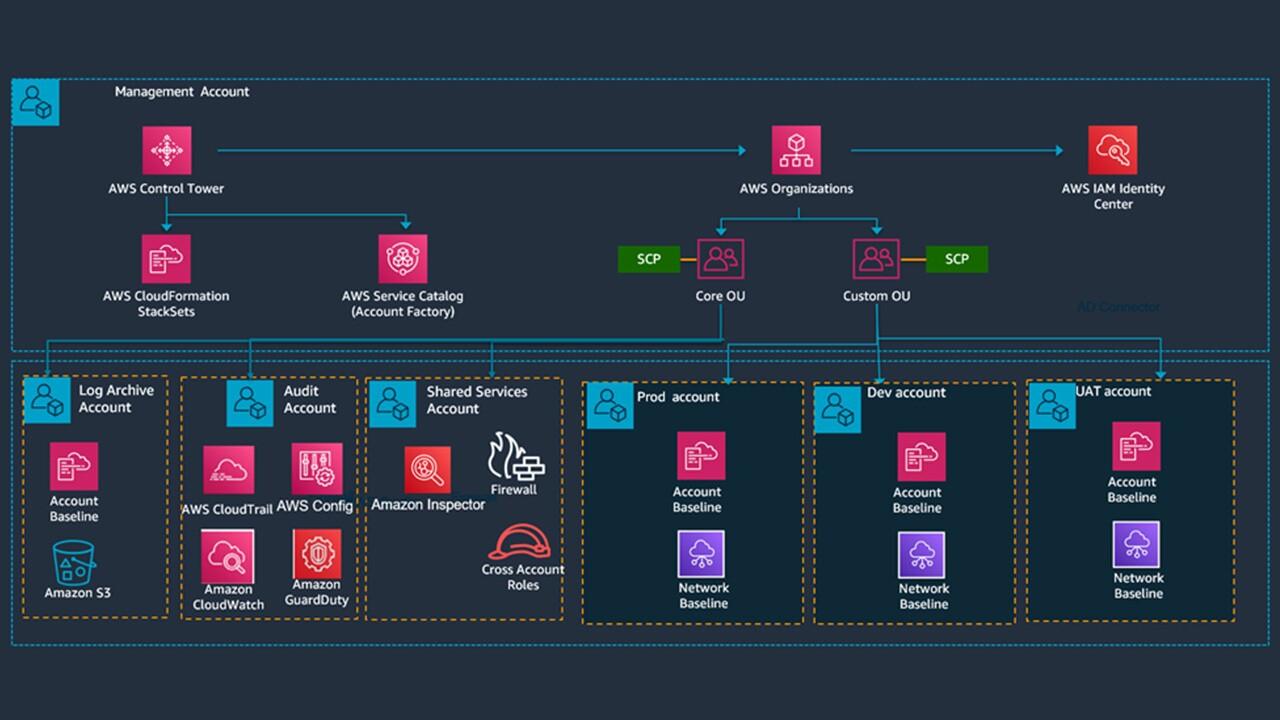
AWS Organizations is a powerful service that enables you to centrally manage and govern multiple AWS accounts. A well-designed multi-account strategy is essential for enterprises looking to scale their cloud operations securely and efficiently.
Why Multi-Account Strategy?
A multi-account strategy provides numerous benefits for enterprise cloud adoption:
Enhanced Security
Isolate workloads and enforce security boundaries with Service Control Policies (SCPs).
Cost Management
Track and optimize costs with consolidated billing and cost allocation tags.
Scalability
Easily add new accounts and scale your cloud footprint without complexity.
Compliance
Meet regulatory requirements with centralized governance and audit controls.
Workload Isolation
Separate development, testing, and production environments for better stability.
Agility
Empower teams with autonomous accounts while maintaining central governance.
AWS Organizations Overview
AWS Organizations provides two key capabilities:
- Centralized Management: Manage all your AWS accounts from a single place
- Governance Controls: Apply policies across accounts using Service Control Policies (SCPs)
- Consolidated Billing: Combine usage and get volume discounts
- Account Automation: Automate account creation and management
Multi-Account Structure
Account Types
Management Account
Central management, billing, and administration. Only for management purposes — no workloads.
Security Account
Centralized security services, logging, and compliance monitoring across all accounts.
Infrastructure Account
Shared services like networking, CI/CD, and monitoring for the entire organization.
Workload Accounts
Application workloads with separate accounts for Development, Testing, and Production.
Sandbox Accounts
Isolated environments for experimentation and innovation with guardrails to prevent sprawl.
Log Archive Account
Centralized storage for CloudTrail logs, Config history, and other audit data.
Organizational Units (OUs)
- Root OU: Top-level organizational unit containing all accounts
- Security OU: Contains security and logging accounts
- Infrastructure OU: Contains shared services and networking accounts
- Workload OU: Contains application workloads (Dev, Test, Prod)
- Sandbox OU: Contains sandbox accounts for experimentation
Service Control Policies (SCPs)
SCPs are the primary governance mechanism in AWS Organizations. They define what actions are allowed or denied across accounts.
SCP Best Practices
- Use Deny Policies: Start with a default deny policy and explicitly allow what's needed
- Layer Policies: Apply policies at different levels (Root, OU, Account)
- Test Before Applying: Use a sandbox account to test SCPs
- Regular Reviews: Review and update SCPs as your organization evolves
- Document Exemptions: Document any exceptions to SCPs
Common SCP Patterns
- ✅ Restrict regions to approved ones
- ✅ Prevent deletion of CloudTrail and Config
- ✅ Deny creation of expensive instance types
- ✅ Enforce tagging requirements
- ✅ Restrict IAM actions
- ✅ Prevent disabling of encryption
Centralized Logging & Monitoring
Key Components
- AWS CloudTrail: Enable in all regions and aggregate to a central log archive account
- AWS Config: Track configuration changes across all accounts
- AWS Security Hub: Centralize security findings from all accounts
- Amazon GuardDuty: Detect threats across all accounts
- AWS CloudWatch: Central monitoring and alerting
Best Practices
- ✅ Enable CloudTrail in all regions for all accounts
- ✅ Aggregate logs to a central S3 bucket
- ✅ Set up cross-account CloudWatch dashboards
- ✅ Implement centralized alerting for security events
- ✅ Use AWS Organizations for delegated administration
Networking Architecture
Key Components
- Transit Gateway: Central hub for VPC connectivity across accounts
- VPC Peering: Direct connectivity between VPCs
- VPN/Direct Connect: On-premises connectivity
- Route 53: Centralized DNS management
- Firewall Manager: Centralized security group management
Best Practices
- ✅ Use a dedicated infrastructure account for networking
- ✅ Implement a hub-and-spoke network model
- ✅ Use non-overlapping CIDR ranges
- ✅ Centralize internet egress through a transit VPC
- ✅ Use AWS Network Firewall for centralized security
Cost Management
Key Components
- Consolidated Billing: Combine usage and get volume discounts
- Cost Allocation Tags: Tag all resources for cost attribution
- AWS Budgets: Set budgets and receive alerts
- AWS Cost Explorer: Analyze costs across accounts
- Resource Groups: Group resources for cost tracking
Best Practices
- ✅ Enforce consistent tagging across all accounts
- ✅ Use cost allocation tags for business units and projects
- ✅ Set up budget alerts at the account and OU level
- ✅ Implement FinOps practices with cost reviews
- ✅ Use AWS Cost Anomaly Detection for cost anomalies
Identity Management
Key Components
- AWS IAM Identity Center: Centralized user management across accounts
- Single Sign-On (SSO): Federated access for users
- Permission Sets: Define permissions once and apply across accounts
- Application Assignments: Manage access to cloud applications
Best Practices
- ✅ Use AWS IAM Identity Center for central user management
- ✅ Implement least privilege access with permission sets
- ✅ Use external identity providers (Okta, Azure AD)
- ✅ Enable MFA for all users
- ✅ Regularly review access and permissions
Implementation Roadmap
📋 5-Step Implementation Plan
- Assess: Evaluate current environment and define requirements
- Design: Create account structure, OU hierarchy, and governance policies
- Setup: Create management account, OUs, and SCPs
- Implement: Set up centralized logging, monitoring, and networking
- Migrate: Move existing accounts to AWS Organizations and test
✅ Multi-Account Strategy Checklist
- ✅ Define account types and purpose
- ✅ Create OU structure
- ✅ Implement SCPs for governance
- ✅ Set up centralized logging
- ✅ Configure centralized monitoring
- ✅ Design network architecture
- ✅ Implement cost management
- ✅ Set up identity management
Common Pitfalls to Avoid
- Overcomplicating Structure: Start simple and evolve
- Lack of Governance: Implement SCPs early
- Poor Tagging Strategy: Enforce consistent tagging
- Inadequate Monitoring: Set up centralized logging
- No Automation: Use Infrastructure as Code
At DeployInCloud, we help enterprises design and implement multi-account AWS strategies using AWS Organizations. Contact us for a free multi-account assessment today.