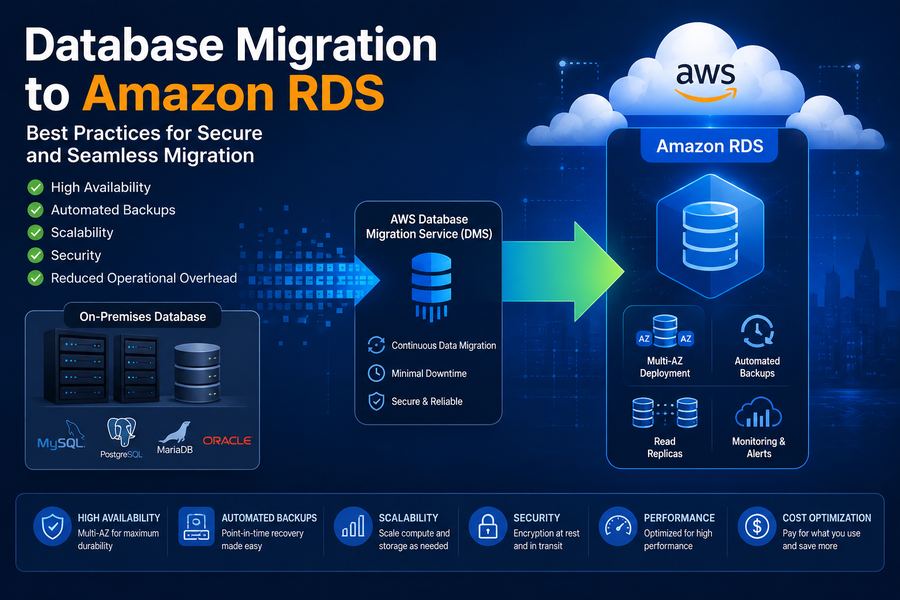
Amazon Relational Database Service (RDS) is a managed database service that makes it easy to set up, operate, and scale a relational database in the cloud. It provides cost-efficient, resizable capacity while automating time-consuming administration tasks like hardware provisioning, database setup, patching, and backups.
In this comprehensive guide, we'll cover:
- Introduction to AWS RDS
- Supported database engines
- Migration strategies and approaches
- AWS Database Migration Service (DMS)
- Database replication strategies
- Cutover strategies
- Performance tuning
- Best practices and checklist
Supported Database Engines
AWS RDS supports multiple database engines, giving you flexibility to choose the best fit for your workload:
Migration Strategies
1. Homogeneous Migration
Moving from the same database engine (e.g., MySQL on-premise to MySQL RDS). This is the simplest and most straightforward migration path.
2. Heterogeneous Migration
Moving from one database engine to another (e.g., Oracle to PostgreSQL). This requires schema conversion and data transformation.
3. Lift and Shift
Migrating databases as-is to RDS with minimal changes. Best for quick migrations with minimal downtime.
Migration Strategies Comparison
| Migration Type | Complexity | Downtime | Best For |
|---|---|---|---|
| Homogeneous | Low | Minimal | Same engine, simple migration |
| Heterogeneous | High | Moderate | Engine modernization |
| Lift and Shift | Low | Minimal | Quick migration, minimal changes |
AWS Database Migration Service (DMS)
AWS DMS is a cloud service that makes it easy to migrate relational databases, data warehouses, NoSQL databases, and other types of data stores. It supports:
- Continuous Data Replication: Keep source and target databases in sync
- Minimal Downtime: Perform migration with minimal application downtime
- Homogeneous & Heterogeneous: Support for both types of migrations
- Schema Conversion: AWS SCT for heterogeneous migrations
Database Replication
Full Load
Initial copy of all data from source to target. Suitable for small databases or when downtime is acceptable.
CDC (Change Data Capture)
Continuous replication of changes made to the source database. Essential for zero-downtime migrations.
Replication Types
- One-time: Single full load migration
- Continuous: Ongoing replication with CDC
- Hybrid: Full load followed by CDC
Cutover Strategies
1. Big Bang Cutover
Switch all applications to the new database at once. Requires careful planning and testing.
2. Phased Cutover
Gradually move applications to the new database in phases. Reduces risk and allows for rollback.
3. Parallel Run
Run both databases in parallel with synchronization. Allows for validation and rollback capability.
Performance Tuning
RDS Instance Selection
- Memory Optimized: R5, R6i for memory-intensive workloads
- Compute Optimized: C5, C6i for CPU-intensive workloads
- Storage Optimized: I3 for high I/O workloads
- General Purpose: M5, M6i for balanced workloads
RDS Storage Options
- General Purpose (gp2/gp3): Balanced performance
- Provisioned IOPS (io1/io2): High performance for critical databases
- Magnetic: Cost-effective for dev/test environments
Performance Optimization Tips
- Use RDS Performance Insights for monitoring
- Enable Enhanced Monitoring for detailed metrics
- Implement read replicas for read-heavy workloads
- Use Multi-AZ for high availability
- Regularly analyze and optimize queries
Best Practices
- Test thoroughly: Validate schema, data, and performance before cutover
- Monitor performance: Use CloudWatch and Performance Insights
- Plan for security: Use encryption, IAM, and security groups
- Backup strategy: Automated backups and snapshots
- High availability: Use Multi-AZ deployment
✅ Database Migration Checklist
- ✅ Assess source database and dependencies
- ✅ Choose target database engine and version
- ✅ Plan migration strategy and timeline
- ✅ Set up RDS instance with appropriate size
- ✅ Configure security groups and network
- ✅ Set up AWS DMS replication task
- ✅ Test cutover procedures in staging
- ✅ Monitor performance and optimize
At DeployInCloud, we've helped 200+ enterprises migrate their databases to AWS RDS. Contact us for a free database migration assessment today.