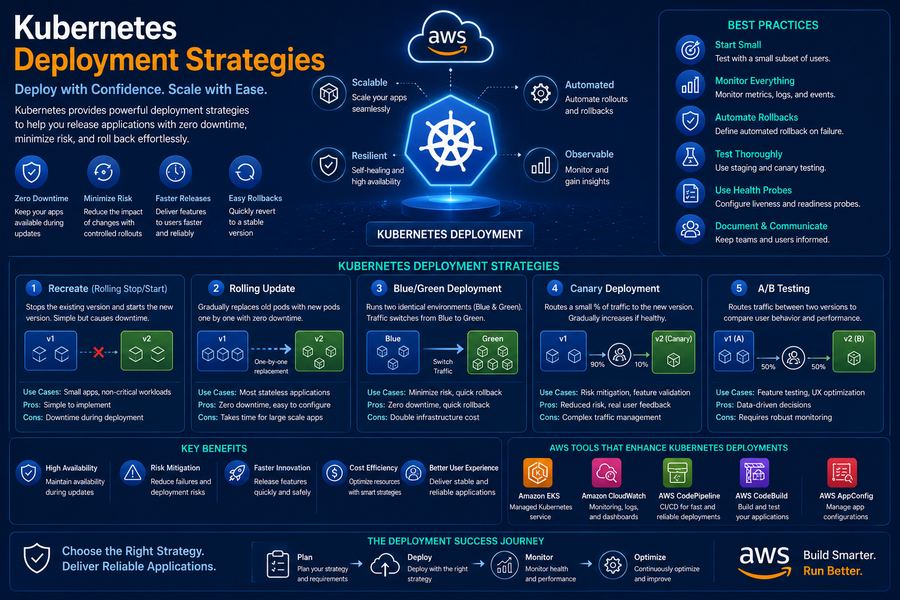
Kubernetes provides powerful deployment strategies to manage application updates with minimal downtime and risk. Choosing the right deployment strategy is critical for maintaining application availability and user experience during updates.
Rolling Update Strategy
Rolling Update is the default deployment strategy in Kubernetes. It gradually replaces old pods with new ones, ensuring zero downtime during the update process.
Rolling Update
Gradually updates pods with zero downtime. Configurable with maxSurge and maxUnavailable parameters.
How It Works
- maxSurge: Maximum number of pods that can be created above the desired state
- maxUnavailable: Maximum number of pods that can be unavailable during the update
- minReadySeconds: Minimum time a pod must be ready before considered available
Blue-Green Deployment
Blue-Green deployment maintains two identical environments: Blue (current version) and Green (new version). Traffic is switched from Blue to Green after validation.
Blue-Green Deployment
Maintains two environments (Blue and Green). Zero-downtime switching with instant rollback.
How It Works
- Blue: Current production version (v1)
- Green: New version to be deployed (v2)
- Service: Points to active version
- Switch: Update service selector to point to Green
Canary Deployment
Canary deployment gradually rolls out changes to a small subset of users before rolling out to all users, allowing for testing in production.
Canary Deployment
Gradually roll out changes to a small subset of users. Test in production with minimal risk.
How It Works
- Step 1: Deploy new version with minimal replicas (10% of traffic)
- Step 2: Monitor metrics and user feedback
- Step 3: Gradually increase traffic to new version
- Step 4: Fully roll out or rollback based on results
A/B Testing Deployment
A/B testing deployment allows you to run two versions of your application simultaneously to test user engagement and conversion rates.
A/B Testing
Run two versions simultaneously for user testing. Measure engagement and conversion rates.
How It Works
- Version A: Control version (current)
- Version B: Treatment version (new feature)
- Traffic Split: 50/50 or customized split
- Analysis: Measure user behavior and engagement
Strategy Comparison
Best Practices
- Start with Rolling Updates: Use the default strategy for simplicity
- Use Liveness and Readiness Probes: Ensure pods are healthy before receiving traffic
- Implement Rollback Strategies: Always have a rollback plan
- Monitor Metrics: Use Prometheus and Grafana for observability
- Test in Staging: Always test deployments in a staging environment first
- Use GitOps: Implement GitOps with ArgoCD or Flux for automated deployments
At DeployInCloud, we help enterprises implement Kubernetes deployment strategies. Contact us for a free DevOps assessment today.