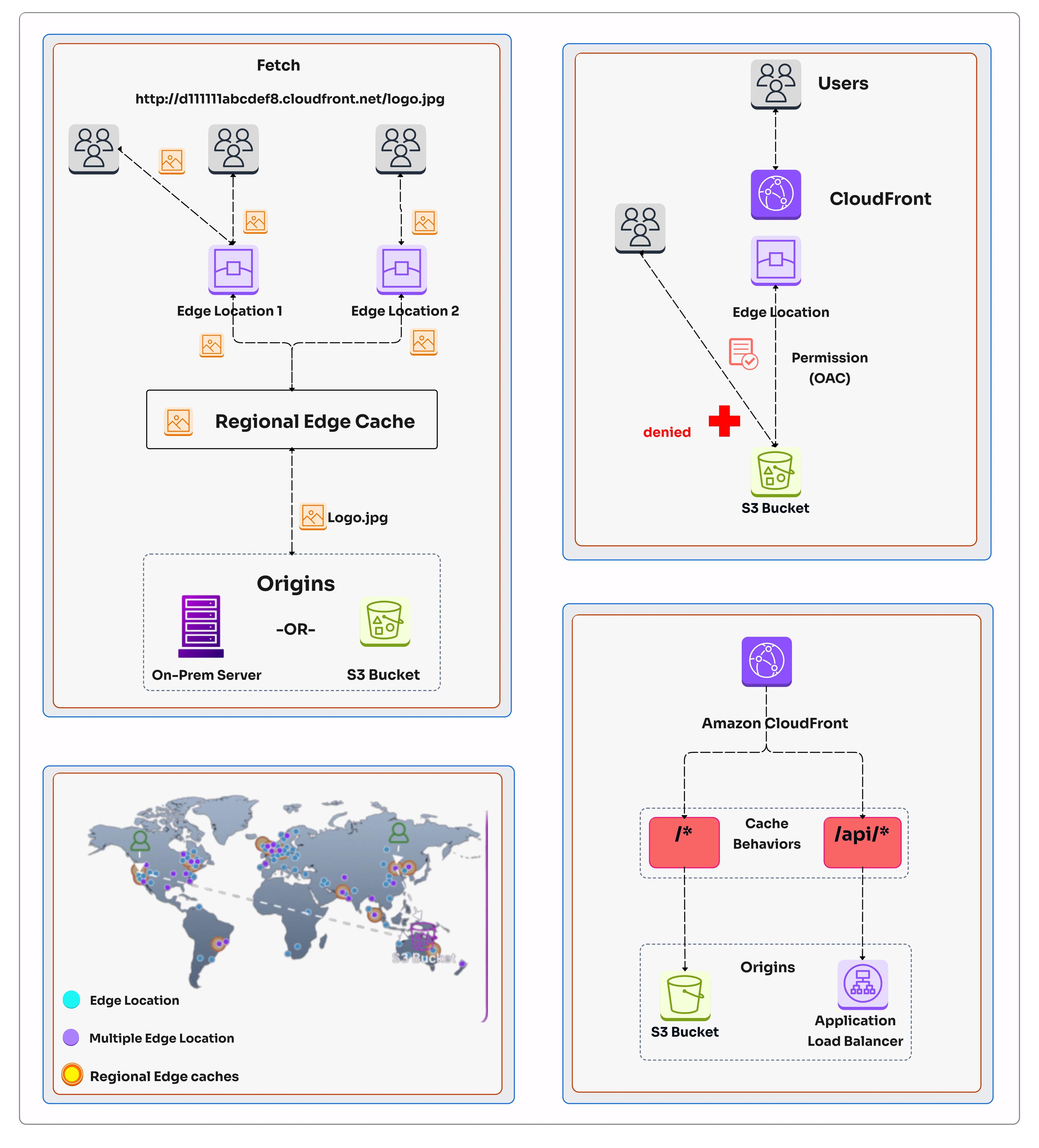
Amazon CloudFront is a fast content delivery network (CDN) that securely delivers data, videos, applications, and APIs to customers globally with low latency and high transfer speeds. Optimizing your CloudFront configuration can significantly improve user experience and reduce costs.
Performance Metrics
1. Cache Optimization
Define Cache Policies
- Cache Control Headers: Set appropriate Cache-Control and Expires headers
- Default TTL: Set reasonable default TTL for dynamic content
- Minimum TTL: Ensure minimum TTL for frequently accessed content
- Maximum TTL: Set maximum TTL to avoid stale content
Cache Behavior Settings
- Cache Based on Query Strings: Control caching for dynamic content
- Cache Based on Cookies: Cache based on cookie values
- Cache Based on Headers: Include relevant headers in cache key
- Origin Shield: Use Origin Shield for better cache hit ratio
2. Compression
Enable Compression
- Compress Text Files: Enable compression for CSS, JS, HTML, and JSON
- GZIP & Brotli: Support both GZIP and Brotli compression
- Automatic Compression: CloudFront automatically compresses eligible content
- Avoid Double Compression: Ensure origin doesn't compress already compressed files
Compression Benefits
- ✅ Reduces file size by 60-70%
- ✅ Faster download times for users
- ✅ Reduced bandwidth costs
- ✅ Better user experience
3. Origin Configuration
Optimize Origin
- Multiple Origins: Use multiple origins for different content types
- Origin Shielding: Reduce origin load with Origin Shield
- Origin Connection: Use keep-alive connections
- Origin Timeout: Configure appropriate timeout values
Origin Types
- S3 Origin: Use S3 as origin for static content
- EC2 Origin: Use EC2 for dynamic content
- Load Balancer: Use ALB for distributed origin
- Custom Origin: Use custom domains as origins
4. Edge Location Selection
Global Coverage
- Edge Locations: 300+ edge locations globally
- Regional Edge Caches: Additional caching layers for popular content
- Latency Based Routing: Route requests to nearest edge location
- GEO Restricted Delivery: Restrict content delivery to specific regions
Best Practices
- ✅ Use AWS Global Accelerator with CloudFront
- ✅ Monitor edge location performance
- ✅ Use custom SSL certificates
- ✅ Enable IPv6 support
5. SSL/TLS Optimization
SSL/TLS Best Practices
- Custom SSL: Use custom SSL certificates for your domain
- TLS Version: Support modern TLS versions (1.2, 1.3)
- SNI Support: Use Server Name Indication for multiple domains
- OCSP Stapling: Enable OCSP stapling for faster SSL handshake
Performance Impact
- ✅ Faster SSL handshake with OCSP stapling
- ✅ Reduced latency with modern TLS
- ✅ Better security with latest TLS versions
- ✅ Improved user experience
6. Content Delivery Optimization
File Optimization
Minify CSS, JS, and HTML files. Optimize images and use responsive images for better delivery.
HTTP/2 & HTTP/3
Enable HTTP/2 and HTTP/3 for faster multiplexing and reduced latency.
GZIP/Brotli
Enable compression for text-based content. Brotli offers better compression ratios.
Image Optimization
Use WebP format, responsive images, and lazy loading for better performance.
7. Cache Invalidation
Invalidation Strategies
- Individual File Invalidation: Invalidate specific files
- Path Pattern Invalidation: Invalidate files matching a path pattern
- Versioned URLs: Use versioning to avoid invalidation
- Batch Invalidation: Batch invalidations for efficiency
Best Practices
- ✅ Use versioned URLs for assets to avoid invalidation
- ✅ Invalidate only when necessary
- ✅ Batch invalidations to reduce API calls
- ✅ Monitor invalidation status
8. Monitoring & Analytics
Key Metrics
- Cache Hit Ratio: Monitor cache efficiency
- Latency: Monitor response times
- Error Rates: Monitor 4xx and 5xx errors
- Transfer Rates: Monitor data transfer rates
Monitoring Tools
- CloudWatch: Monitor CloudFront metrics
- CloudFront Reports: Built-in reports and analytics
- Real-Time Logs: Enable real-time logging for troubleshooting
- Third-Party Analytics: Integrate with analytics tools
9. Security & DDoS Protection
Security Features
- AWS WAF: Protect against web attacks
- AWS Shield: DDoS protection
- Signed URLs/Cookies: Restrict access to content
- Field-Level Encryption: Encrypt sensitive data
Best Practices
- ✅ Enable AWS Shield Advanced for critical workloads
- ✅ Use AWS WAF with OWASP Top 10 rules
- ✅ Implement signed URLs for private content
- ✅ Use field-level encryption for sensitive data
10. Cost Optimization
Cost Saving Strategies
- Data Transfer Out: Monitor data transfer costs
- Cache Optimization: Reduce origin costs
- Compression: Reduce data transfer
- Reserved Capacity: Use reserved capacity for predictable usage
Cost Management
- ✅ Use AWS Cost Explorer to monitor costs
- ✅ Set up budget alerts
- ✅ Optimize cache settings
- ✅ Use price classes to limit edge locations
CloudFront Optimization Checklist
- ✅ Define cache policies and TTLs
- ✅ Enable compression (GZIP & Brotli)
- ✅ Configure multiple origins
- ✅ Enable Origin Shield
- ✅ Set up custom SSL certificates
- ✅ Enable HTTP/2 and HTTP/3
- ✅ Implement cache invalidation strategy
- ✅ Set up monitoring and analytics
- ✅ Enable WAF and DDoS protection
- ✅ Optimize cost with price classes
At DeployInCloud, we help enterprises optimize their CloudFront configurations for maximum performance and cost efficiency. Contact us for a free CDN assessment today.