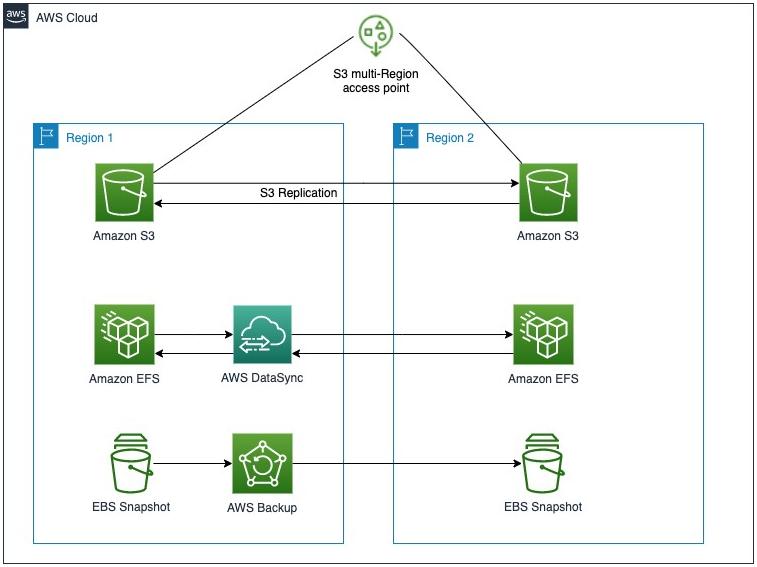
A robust backup strategy is essential for protecting your production workloads against data loss, corruption, and disasters. AWS provides comprehensive backup and recovery services that help you protect your critical data with minimal effort.
Key Backup Metrics
Understanding RTO & RPO
Recovery Point Objective (RPO)
- Definition: Maximum acceptable data loss measured in time
- Example: 1-hour RPO means you can lose up to 1 hour of data
- Impact: Determines backup frequency
- Critical Workloads: 15 minutes or less
- Non-Critical: 24 hours or more
Recovery Time Objective (RTO)
- Definition: Maximum acceptable downtime
- Example: 4-hour RTO means you must recover within 4 hours
- Impact: Determines recovery strategy
- Critical Workloads: 1 hour or less
- Non-Critical: 8-24 hours
AWS Backup Services
1. AWS Backup
- Centralized Management: Manage backups across AWS services
- Automated Backups: Schedule and automate backups
- Cross-Region Backup: Replicate backups to other regions
- Lifecycle Management: Define retention policies
- Tag-Based Policies: Automate backups based on tags
2. Amazon S3 Backup
- S3 Versioning: Protect against accidental deletion
- S3 Replication: Replicate data to other buckets
- S3 Glacier: Cost-effective archival storage
- S3 Intelligent-Tiering: Automatic tier optimization
3. Amazon RDS Backups
- Automated Backups: Daily backups with transaction logs
- Manual Snapshots: User-initiated point-in-time snapshots
- Cross-Region Snapshots: Copy snapshots to other regions
- Point-in-Time Recovery: Restore to any point in time
4. Amazon EBS Snapshots
- Incremental Snapshots: Only changed blocks are stored
- Cross-Region Copy: Copy snapshots to other regions
- Lifecycle Manager: Automate snapshot creation and retention
- Fast Snapshot Restore: Pre-initialize snapshots for faster restore
Backup Strategy Components
Frequency
Define backup frequency based on RPO requirements. Critical workloads may need hourly backups.
Retention
Define retention periods based on compliance and business requirements. Retain backups for days, weeks, or years.
Location
Store backups in multiple regions for disaster recovery. Use cross-region replication for critical data.
Security
Encrypt backups, control access with IAM policies, and enable immutability for critical backups.
Testing
Regularly test backup restores to ensure recoverability. Document and validate recovery procedures.
Cost
Optimize backup costs with tiered storage, lifecycle policies, and incremental backups.
Backup Best Practices
1. Define Clear Requirements
- Identify critical workloads and data
- Define RTO and RPO for each workload
- Document compliance requirements
- Define retention policies
2. Automate Everything
- Use AWS Backup for automated backups
- Implement lifecycle policies
- Use tag-based backup policies
- Automate backup testing
3. Secure Your Backups
- Encrypt backups with AWS KMS
- Implement least-privilege access
- Enable multi-factor authentication
- Use AWS Backup Audit Manager for compliance
4. Test Your Backups
- Regularly test restore procedures
- Validate data integrity
- Document recovery steps
- Simulate disaster scenarios
Workload-Specific Strategies
Databases (RDS, DynamoDB)
- ✅ Enable automated backups with 7-35 day retention
- ✅ Take manual snapshots before major changes
- ✅ Copy snapshots to another region for DR
- ✅ Use point-in-time recovery for continuous protection
EC2 Instances
- ✅ Use AWS Backup for EC2 backups
- ✅ Take AMIs for root volumes
- ✅ Use EBS snapshots for data volumes
- ✅ Test AMI restores regularly
S3 Data
- ✅ Enable S3 versioning
- ✅ Use S3 replication for cross-region backup
- ✅ Implement S3 Lifecycle policies
- ✅ Use S3 Glacier for long-term archival
File Storage (EFS, FSx)
- ✅ Use AWS Backup for EFS backups
- ✅ Implement lifecycle policies
- ✅ Replicate to another region
- ✅ Test restore procedures
Cost Optimization
Cost Saving Strategies
- Incremental Backups: Store only changed blocks
- Lifecycle Policies: Move older backups to cheaper storage
- Retention Optimization: Align retention with compliance requirements
- Deduplication: Use services with built-in deduplication
- Compression: Compress backup data when possible
Cost Monitoring
- ✅ Use AWS Cost Explorer to track backup costs
- ✅ Set up budget alerts
- ✅ Analyze backup storage trends
- ✅ Optimize backup schedules
Disaster Recovery Planning
DR Components
- Backup Replication: Replicate backups to other regions
- Recovery Plan: Document step-by-step recovery procedures
- DR Testing: Regularly test DR procedures
- Automation: Use AWS CloudFormation for DR automation
DR Scenarios
- ✅ Region failure
- ✅ AZ failure
- ✅ Data corruption
- ✅ Ransomware attack
- ✅ Accidental deletion
✅ Backup Checklist
- ✅ Define RTO and RPO requirements
- ✅ Enable automated backups
- ✅ Encrypt all backups
- ✅ Implement lifecycle policies
- ✅ Test backup restores regularly
- ✅ Replicate backups to other regions
- ✅ Document recovery procedures
- ✅ Monitor backup status and costs
At DeployInCloud, we help enterprises design and implement comprehensive backup strategies. Contact us for a free backup assessment today.