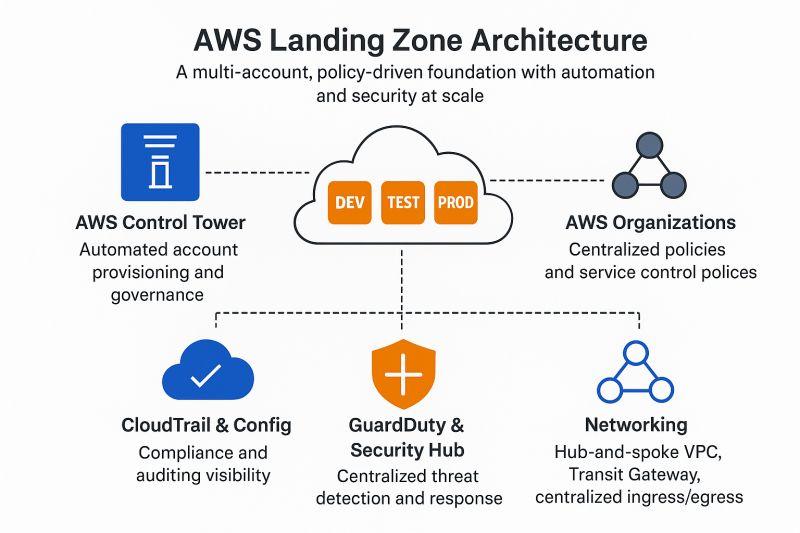
AWS Landing Zone is a solution that helps you quickly set up a secure, scalable, and well-governed multi-account AWS environment. It provides a foundation for your cloud journey by establishing a baseline architecture with best practices for security, networking, and account management.
What is AWS Landing Zone?
AWS Landing Zone is a best-practice baseline for building a multi-account AWS environment. It provides:
- Multi-Account Structure: Logical separation of workloads with dedicated accounts
- Centralized Security: Guardrails and security controls across all accounts
- Networking Foundation: VPC, subnets, and connectivity setup
- Governance Framework: Policies, controls, and compliance monitoring
- Automation: Automated account provisioning and management
Why Use AWS Landing Zone?
- Security: Enforce security policies across all accounts
- Scalability: Easily add new accounts and workloads
- Cost Management: Track and optimize costs across accounts
- Compliance: Meet regulatory requirements with ease
- Operational Efficiency: Centralized management and monitoring
Core Components of AWS Landing Zone
Multi-Account Structure
Logical separation of workloads with dedicated accounts for different purposes.
Security Dev ProdSecurity & Governance
Centralized security controls, guardrails, and compliance monitoring.
Guardrails ComplianceNetwork Architecture
VPC design, connectivity, and network segmentation for isolation.
VPC VPN DXCost Management
Centralized billing, cost allocation, and optimization across accounts.
FinOps Cost ExplorerAutomation
Automated account provisioning and infrastructure deployment.
CI/CD IaCLogging & Monitoring
Centralized logging, monitoring, and alerting across all accounts.
CloudWatch CloudTrailMulti-Account Structure
A well-designed multi-account structure is the foundation of AWS Landing Zone:
Account Types
- Management Account: Central management and billing
- Security Account: Centralized security and compliance
- Infrastructure Account: Shared services and networking
- Workload Accounts: Separate accounts for different workloads (Dev, Test, Prod)
Organizational Units (OUs)
- Root OU: Top-level organizational unit
- Security OU: Security and compliance accounts
- Infrastructure OU: Shared services accounts
- Workload OU: Application workload accounts
- Sandbox OU: Development and testing accounts
Security & Governance
Guardrails
- Preventative Guardrails: Prevent non-compliant actions (SCPs)
- Detective Guardrails: Detect and alert on non-compliant actions (AWS Config)
- Proactive Guardrails: Review and approve changes before deployment
Key Security Services
- AWS Organizations: Central management and SCPs
- AWS Config: Compliance monitoring and configuration management
- AWS Security Hub: Centralized security findings
- AWS IAM Identity Center: Centralized user access management
- AWS CloudTrail: API logging across all accounts
Network Architecture
Network Design Principles
- Segmentation: Isolate workloads with separate VPCs
- Connectivity: Establish secure connectivity between accounts and on-premises
- Security: Implement security groups, NACLs, and WAF
- Scalability: Design for future growth with CIDR planning
Key Networking Components
- Transit Gateway: Central hub for VPC connectivity
- VPC Peering: Direct connectivity between VPCs
- VPN/Direct Connect: Connectivity to on-premises
- Route53: DNS management across accounts
- CloudFront: Global content delivery
Implementation Steps
Plan Your AWS Organization Structure
Define your OU structure, account types, and naming conventions based on your business requirements.
Set Up Management and Security Accounts
Create the management account for billing and the security account for centralized security controls.
Design Network Architecture
Plan your VPCs, subnets, CIDR ranges, and connectivity between accounts and on-premises.
Implement Security Guardrails
Define and implement SCPs, AWS Config rules, and security baselines across all accounts.
Set Up Centralized Logging
Configure CloudTrail, CloudWatch, and Config to centralize logs in the security account.
Configure Identity Management
Set up AWS IAM Identity Center for centralized user access and permissions management.
Enable Cost Management
Configure consolidated billing, cost allocation tags, and AWS Budgets for cost tracking.
Test and Deploy
Validate your Landing Zone setup with test workloads and deploy to production.
Best Practices
- Start Small: Begin with a minimal structure and expand as needed
- Use Service Control Policies (SCPs): Enforce security boundaries
- Implement Centralized Logging: Aggregate logs for security and compliance
- Use Infrastructure as Code: Automate Landing Zone deployment
- Monitor Continuously: Use AWS Config and Security Hub for ongoing monitoring
- Document Everything: Maintain documentation for your architecture
Tools & Services
🔧 Key AWS Services
✅ Landing Zone Checklist
- ✅ Define OU structure and account types
- ✅ Create management and security accounts
- ✅ Design VPC and network architecture
- ✅ Implement SCPs for governance
- ✅ Configure centralized logging and monitoring
- ✅ Set up identity management
- ✅ Enable cost management and tagging
- ✅ Test and validate Landing Zone
At DeployInCloud, we help enterprises design and implement AWS Landing Zones. Contact us for a free Landing Zone assessment today.